Using QR Codes in Business: Strategic Value and Practical Use Cases
QR codes are no longer just a shortcut to a link. For businesses, they connect offline touchpoints with mobile experiences, analytics, and process automation.
In a digital-first market, it is not enough for a business to be online. Customers also need a fast, obvious path from a physical touchpoint to the action they want to take. A person sees packaging, a menu, a flyer, a sign, or an ad banner and, within seconds, can open a website, pay for an order, leave a review, save a contact, or claim a personalized offer. This is where a QR code becomes the bridge between the physical world and the digital journey.
A QR code (Quick Response Code) is a two-dimensional matrix code that can be scanned with a smartphone camera or a dedicated scanner. At first glance, it may look like a small graphic element, but its business value is much broader. A QR code can open a landing page, launch a form, share contact details, connect to Wi-Fi, add an event to a calendar, display instructions, or move a user into a measurable analytics funnel.
In this article, we will look at QR codes not as decoration on a design layout, but as a practical business tool. We will explain how they differ from traditional barcodes, when static codes are enough, when dynamic codes are the better choice, and how QR codes support delivery, restaurants, and cafes, marketing campaigns, logistics, service, and internal workflows. We will also cover analytics, design, UTM tags, and the common mistakes that can weaken even a well-planned campaign.
If you are just starting to explore the topic, this guide will help you quickly understand the key terms and use cases. If QR codes are already part of your business, it will show how to make them more useful: add measurement, improve the mobile path, avoid scanning issues, and reuse codes without unnecessary print costs.
And if you need a practical starting point, you can create your own code with our QR code generator and customize it for real business scenarios.
What a QR Code Is: Technical Basics and Business Context
The QR code was developed by Denso Wave in 1994 for the automotive industry. Its first job was highly practical: to identify parts on production lines quickly and accurately. Over time, the technology became universal because it worked well not only for tracking, but also for moving information between a physical object and a digital environment.
Unlike a classic barcode, which stores data mainly in one direction, a QR code works as a two-dimensional matrix. Information is arranged both horizontally and vertically, so a small image can hold far more data. That data can include URLs, numbers, plain text, contact details, service parameters, byte data, Cyrillic characters, and other symbols.
For business, this matters for two reasons. First, a QR code takes very little space on a physical surface: packaging, a sticker, a menu, a poster, a receipt, or a business card. Second, it does not ask the user to perform a complicated action. They simply open the smartphone camera, point it at the code, and continue into the intended flow.
Types of Data You Can Embed in a QR Code
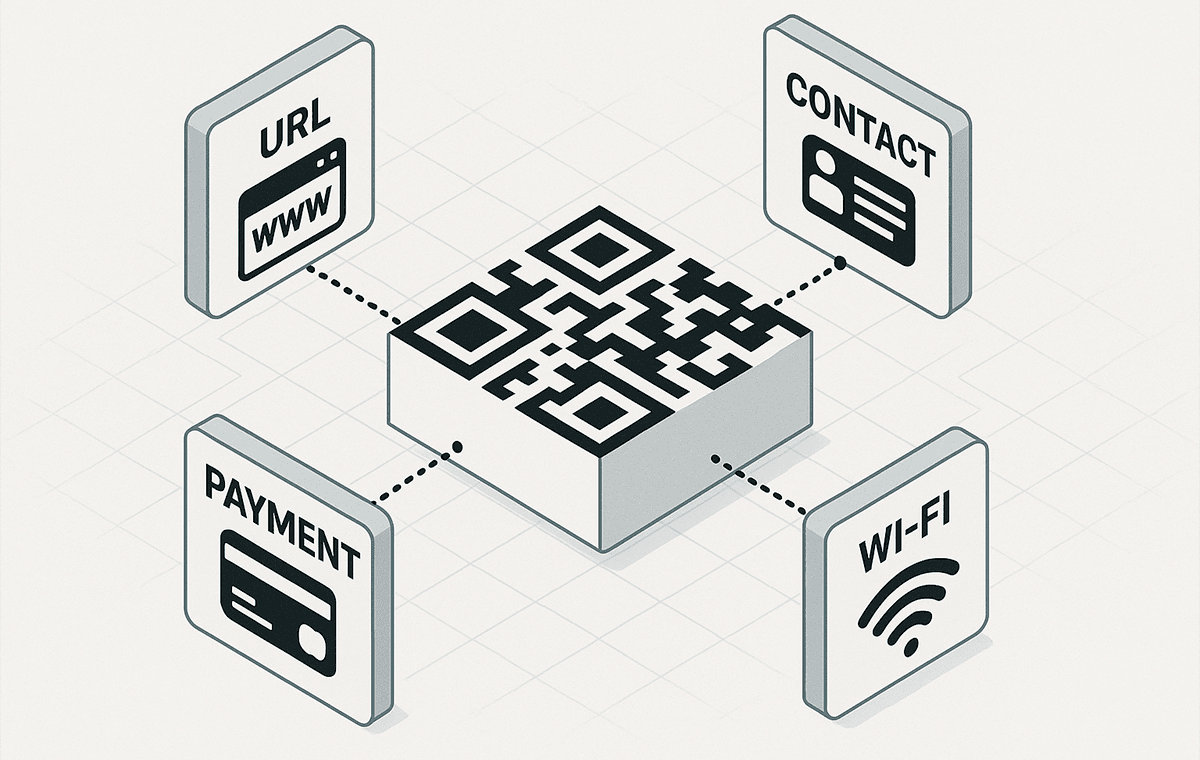
A QR code can share more than a link: contacts, Wi-Fi access, events, text data, and payment information can all be encoded.
Most businesses use QR codes to send people to a website, landing page, PDF, menu, product page, or form. The scenario is simple and familiar: the user scans the code and lands in the right place without typing an address. That is why QR codes for URLs remain the most popular format.
Another common scenario is vCard. A business card with a QR code lets people save a phone number or email address instantly instead of entering it by hand. For managers, consultants, service specialists, and B2B sales teams, it is a simple way to reduce lost contacts after meetings, trade shows, or presentations.
QR codes are also useful for connecting to Wi-Fi, adding events to a calendar, preparing an SMS or email request, sharing text instructions, or opening payment details. In each case, the value is the same: the business removes extra steps, and the user reaches the desired action faster.
Static and Dynamic QR Codes: What Is the Difference?
QR codes can generally be divided into static and dynamic codes. A static QR code stores the data directly inside the image itself. If it contains a link, text, or contact details, that information cannot be changed after the code is created. This option works well for stable data: venue Wi-Fi, an evergreen page, a short instruction, or a contact card.
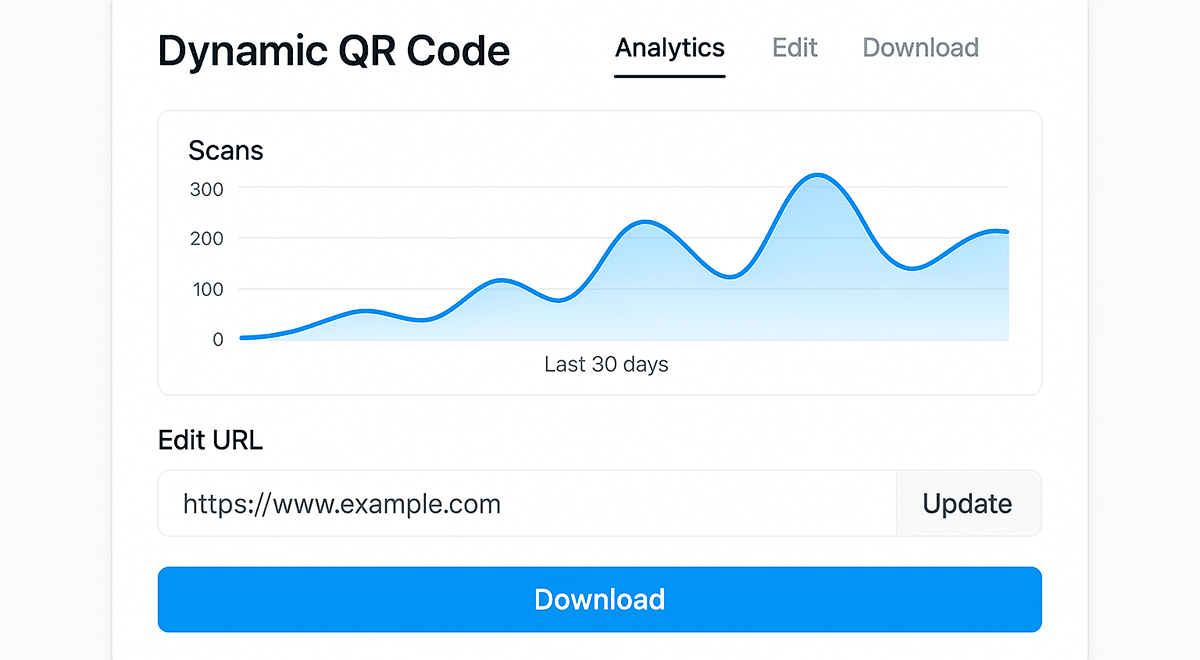
A dynamic QR code works differently. It usually contains a short link or intermediate redirect, while the final destination can be changed in the settings. This is what makes dynamic codes valuable for business: the destination page can be updated without reprinting flyers, packaging, menus, or stickers. For promotions, events, seasonal offers, advertising campaigns, and outdoor placements, that flexibility is a major advantage.
Dynamic QR codes also make analytics possible. A business can see how many times a code was scanned, which devices were used, when scans happened, where they came from, and which visits led to the target action. With UTM tags for Google Analytics or CRM tracking, a QR code becomes a measurable channel, not just a graphic on a layout.
Example: a company prints a QR code on flyers for a seasonal campaign. A week later, the offer changes, but the flyer stays useful because the dynamic code can be redirected to a new page. With a static code, the printed materials would have to be produced again.
Why Businesses Use QR Codes: Benefits That Actually Work
QR codes became a familiar business tool not because they are trendy, but because they solve a practical problem: they shorten the path between user intent and digital action. A person does not type a website address, search for the right section, copy a contact, or install a separate app. They scan the code and enter a flow that has already been prepared for them.
Instant Access to Digital Actions
For the customer, a QR code is the shortest route to the information they need. On product packaging, it can lead to instructions, warranty details, a video review, or a review page. In print advertising, the code opens a landing page with an offer. In a restaurant, it can open an online menu or booking page. In a service center, it can launch a request form or user guide.
This is especially useful when people are not willing to spend time searching. If the action takes only a few seconds, the chance of engagement goes up. If users have to type a URL manually, search for a brand on Google, or move through several screens, part of the audience will never reach the target page.
Business Process Automation
QR codes are not limited to customer-facing communication. In logistics, they help label batches, open accompanying documents, check shipment status, or quickly identify an item in a warehouse. In retail, they support stock control, inventory checks, product records, and access to internal item cards. In service operations, a QR code can open a ticket, instruction, warranty record, or feedback form.
In these scenarios, the QR code becomes part of operational efficiency. It reduces manual data entry, lowers the risk of errors, and helps employees access the information they need faster. This is especially important for businesses with many physical objects: products, boxes, documents, equipment, rooms, or service points.
Omnichannel Marketing and Offline Measurement
QR codes are effective in marketing because they connect offline media with digital analytics. A flyer, billboard, package, receipt, menu, or storefront no longer has to be a blind spot. If each placement uses a separate dynamic code or different UTM tags, the business can see which channel drives more visits and conversions.
For example, a company may run a campaign across Instagram, a print magazine, and product packaging at the same time. Separate QR codes show which channel generates more scans, where users convert better, and which placement barely performs. You can read more about this approach in our article about QR codes in marketing.
Flexibility After Printing
One of the strongest advantages of dynamic QR codes is the ability to change the destination after materials have been printed. For a business, this means less risk. If a landing page changes, a promotion ends, the product range is updated, or a new offer appears, there is no need to redesign the entire physical asset. You only update the destination in the code settings.
This is especially useful for seasonal campaigns, events, international promotions, A/B tests, and materials printed in large quantities. In this case, the QR code works not as a one-time link, but as a managed asset that can be updated throughout the campaign lifecycle.
Contactless Convenience
Since the pandemic, users have become comfortable with contactless flows: menus, payments, registrations, instructions, forms, and help materials opened on a phone. QR codes fit this behavior because they require no app installation and work with the standard camera. For a business, it is a simple way to give customers access to a digital service exactly when the need appears.
Where Businesses Use QR Codes: Industries, Examples, and Use Cases
QR codes are versatile because they can adapt to almost any business model. They are useful in B2C scenarios where the goal is quick customer interaction, and in B2B workflows where identification, tracking, documentation, and control matter. Below are the most common areas where QR codes have already become part of day-to-day operations.
Retail and eCommerce
In retail, QR codes shorten the path from interest to purchase. A shopper sees a product in a store, on a shelf, or in an ad and can instantly open the product page, check specifications, read reviews, watch a video guide, view warranty terms, or see availability in other locations. For eCommerce, this is a way to connect physical materials with online sales.
QR codes are also useful after the purchase. They can lead to instructions, warranty registration, support pages, or a loyalty program. When customers do not have to search for the right section themselves, they are more likely to use the service, leave a review, or return to the brand later.
HoReCa: Restaurants, Cafes, and Hotels
In restaurants, cafes, and hotels, QR codes have become a standard part of the customer experience. The most obvious example is an online menu that guests can open from a table, window display, flyer, or hotel room. But the possibilities go beyond menus. A QR code can lead to booking, delivery, payment, tips, a loyalty program, or a feedback form.
For the venue, this reduces pressure on staff and makes updates easier. If the menu, prices, availability, or seasonal offer changes, the digital page can simply be updated. This topic is covered in more detail in our article about QR codes for delivery, restaurants, and cafes.
Logistics, Warehouses, and Manufacturing
In logistics, QR codes play a more technical but very important role. They help identify an item, batch, pallet, box, route, or document. A warehouse employee or courier can quickly open the needed information from a smartphone or scanner: status, address, supporting documents, instructions, movement history, or internal tracking number.
In manufacturing, QR codes often connect a physical object with a digital record. This may be equipment, a component, a raw material batch, or a finished product. The approach reduces paper documentation and speeds up access to current data. For the business, this is less about marketing and more about process control and fewer operational errors.
Marketing and Advertising
In advertising campaigns, a QR code helps measure what used to be hard to evaluate. When someone sees a billboard or flyer, the business usually does not know whether the ad worked. A QR code with analytics changes that: every scan can be tied to a specific placement, campaign, city, or physical location.
These codes are used on print materials, packaging, POS stands, exhibition booths, outdoor ads, and offline events. They can lead to a website, coupon, lead form, video, social page, or brand social media profiles. The key is not merely to place the code, but to tell users what they will get after scanning it.
Education, Events, and Trade Shows
In event environments, QR codes help organize the attendee journey. A single code can open the event agenda, complete registration, add an event to a calendar, download a presentation, issue a certificate, or collect feedback after a session. This is convenient for both organizers and visitors.
At trade shows, QR codes are especially useful for lead capture. Instead of handing out stacks of printed materials, a company can send visitors to a landing page, request form, or catalog. If the code is dynamic, it can be redirected after the event to another asset: a webinar recording, presentation, or special offer.
Healthcare and Service Businesses
In healthcare and service scenarios, QR codes help people quickly open instructions, appointment forms, results, warranty details, or additional materials. Here it is especially important to think not only about convenience, but also about security, accessibility, and the accuracy of the destination page. If a QR code leads to sensitive information, access control, authorization, or other restrictions should be planned in advance.
Branded QR Code Design: When Appearance Matters
A QR code is a technical element, but its appearance affects trust and scan rates. If the code looks random, has no explanation, and appears without context, users may ignore it. If it is paired with a clear call to action, a branded frame, a logo, and a short explanation, scanning feels more natural.
Branding is especially relevant on packaging, posters, menus, business cards, POS materials, and advertising layouts. It helps the QR code fit the brand identity while still drawing attention to the action. For example, a code labeled "Scan to get a discount" works better than an unexplained square.
At the same time, design must not hurt scannability. Excessive styling, low contrast, a very small size, a complex background, or covering functional zones can make the code unreliable. This is especially critical for payments, authorization, tickets, and any flow where a failed scan immediately damages the user experience.
Before publishing, test the QR code on different smartphones, in different lighting conditions, and from the real distance people will use to scan it. More technical details and examples are available in our article "Branded QR Codes: How to Create a Design That Gets Attention".
QR Analytics: How Data Helps You Make Better Decisions
One of the biggest advantages of dynamic QR codes is the ability to measure offline touchpoints. With traditional print advertising, it is difficult to know how many people were genuinely interested in a material. A QR code with analytics provides concrete data: scan count, time, devices, regions, repeat interactions, and further actions on the website.
Analytics is useful not only for marketers. A business owner can compare the performance of different locations, a sales manager can see which materials generate leads, and an operations team can evaluate whether customers use instructions, menus, or self-service forms. If the data is integrated with a CRM, Google Analytics, or a BI system, the QR code becomes part of the broader measurement stack.
The practical value of analytics appears when the business compares scan volume with outcomes. For example, one poster may drive many visits but few requests, while another gets fewer scans and a better conversion rate. That is a signal to review the offer, landing page, CTA, or placement.
UTM tags help connect scans to a specific campaign, source, and medium. For example, you can measure QR codes on packaging, in a menu, on a billboard, in print advertising, or at a trade show booth separately. This approach is described in more detail in our article about QR analytics, charts, and UTM tags.
The most important point is to plan analytics before the campaign launches, not afterward. If QR codes are already printed without tags and without editing options, part of the data will be lost. That is why business campaigns should plan dynamic codes, UTM structure, and target events on the website from the start.
5 Common Mistakes to Avoid When Implementing QR Codes
Even a useful technology can fail when it is implemented without context. A QR code alone does not guarantee scans, leads, or sales. It must be placed appropriately, labeled clearly, technically stable, and connected to a high-quality mobile page.
1. Using Static Codes for Campaigns That Change
Businesses often print a static QR code on packaging, a flyer, or a poster and later run into a problem: the page changes, the promotion ends, the link needs an update, but the code cannot be edited. As a result, materials either become outdated quickly or send users somewhere that no longer makes sense.
Static codes are perfectly fine for permanent data. But for advertising campaigns, promotions, events, seasonal offers, and any printed materials with a long lifecycle, a dynamic QR code is usually the better choice. It gives the business control after launch.
2. No Analytics
If a QR code has no UTM tags or separate statistics, the business sees only that the code was placed, not what it achieved. The code may work, or it may simply occupy space on a layout. Without data, that is hard to evaluate. This is especially problematic for campaigns that use several channels at once.
The solution is simple: connect analytics before launch. Decide in advance what needs to be measured: scans, visits, leads, purchases, bookings, registrations, or repeat interactions. For this, you can use QR analytics and UTM tags.
3. Poor Design or Low Contrast
A branded QR code can look better than a standard one, but over-styling often hurts scanning. A light code on a light background, a complex texture behind it, a size that is too small, or a logo covering important elements can make scanning unreliable.
Before printing, test the code on real devices. It is important to test not just the file on a screen, but the final layout: size, background, distance, lighting, and print material. This is especially important for menus, billboards, packaging, and tickets, where users will not spend time figuring out why a code does not open.
4. No Context or Explanation
One of the most common weaknesses is an unlabeled QR code. The user sees a square but does not know what will happen after scanning: a menu, discount, form, payment, instruction, or ad. Without clear context, the motivation to scan is lower.
Add a short CTA next to the code: "Open menu", "Get coupon", "Leave a review", "View instructions", "Book a table". This label takes very little space, but it improves expectations and makes the action transparent.
5. Sending Users to a Slow or Non-Mobile Page
QR codes are almost always scanned from smartphones, so the destination page must be fast, responsive, and relevant. If scanning opens a heavy website, an awkward form, or a page that does not match the promise next to the code, the user will close it quickly. The whole journey should be tested: scanning, redirect, loading, content, form, payment, or any other target action.
Key Takeaways: How to Introduce QR Codes Strategically
QR codes are no longer just a way to pass along a link. For businesses, they can support marketing, service, logistics, sales, analytics, and automation. Their effectiveness depends less on the presence of a QR code itself and more on how well the post-scan scenario is designed.
A strong QR flow starts with a specific goal. If the goal is to increase sales, the code should not simply lead to the homepage, but to a relevant offer. If the goal is to collect reviews, the form should be short and easy to use. If the code is placed on packaging, the page should match that exact product. If the QR code is used in advertising, analytics should be ready before printing.
Static QR codes work well for permanent scenarios: Wi-Fi access, contacts, simple instructions, and stable pages. For business campaigns, printed materials, ads, events, and any activity where the link or offer may change, dynamic codes are usually the better option. They let you edit the destination, collect statistics, and manage the QR code as a digital asset.
Design matters too, but it should never interfere with the main function: fast scanning. Brand colors, a logo, and a frame can increase trust when contrast, size, and a clear CTA are preserved. The best QR code is one people notice, understand, and open successfully on the first try.
If you are just getting started, choose one specific scenario: a menu, packaging, business card, flyer, instruction, product page, or feedback form. Then create the code, test it on a smartphone, check the landing page, and add analytics. This approach gives you early data quickly and shows how QR codes can work in your specific business.
You can create your first code in the QR code generator. For business scenarios, it is worth planning not only the code itself, but also the post-scan page, UTM tags, call to action, and a way to measure the result.
An effective QR code should guide users to a specific action and be connected to analytics.