Static QR Codes: Reliable, Simple, and Available Offline
A static QR code stores information directly inside its visual pattern. Unlike a dynamic code, it does not use an intermediate link and does not depend on external servers. Once generated, the encoded data stays fixed.
This format is useful when people need fast access to stable information, unlimited scans, and independence from third-party platforms or an internet connection.
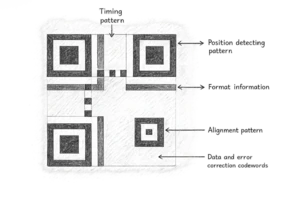
How Direct Data Encoding Works
The data is embedded directly into the code's visual pattern, or modules. When scanned, the smartphone camera recognizes that pattern and decodes it locally. Because no web-server redirect is required, the scan result appears almost instantly.
The format also supports standard error correction. A level of data redundancy is added during generation, so if part of the code is dirty or slightly damaged, the device can often reconstruct the information.
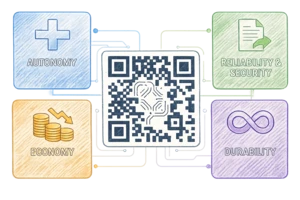
Benefits of the Static Format
FbFast static codes are designed for straightforward tasks where the data does not need to be managed or changed after the code is created.
• Works independently, even offline The code delivers information without a network connection. It can expose Wi-Fi passwords, vCard contacts, or text instructions in rooms and locations with no mobile coverage or internet access.
• Independent from platforms Since there is no redirect through the generator's servers, the code is not tied to subscription plans or changes in service terms. It remains usable as long as the information is still valid and the physical medium stays readable.
• Better data privacy Scanning happens without intermediate trackers. The service does not collect device details, scan time, or user location, which keeps the interaction more private.
• No scan limits Static codes can be generated without creating an account. Once the code is created, FbFast does not limit how many times it can be scanned.
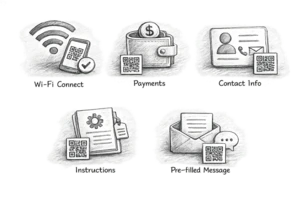
Main Use Cases
The static format works best for standardized data that rarely changes and needs to be available without friction.
- Wi-Fi access. The format can encode the network name (SSID) and password. After scanning, the smartphone can offer a guest or customer an automatic connection without manual entry.
- Payment details. Static codes can be used for crypto wallets or standardized SEPA transfers. Scanning reduces the risk of mistakes that come with typing long account numbers or references by hand.
- Digital contacts (vCard). The code can contain a name, job title, phone number, and email address. After scanning, the data appears as a ready-to-save contact in the smartphone address book.
- Local instructions and labels. Text codes placed on equipment or machinery can include serial numbers or basic safety rules, accessible to staff even without a network connection.
- Message templates. The code can open an email client or SMS app with a prefilled recipient and message, making it easier for the user to send a response.
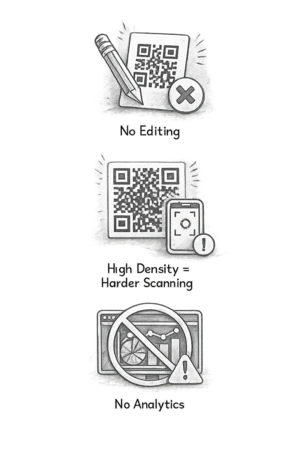
Format Limits: What to Consider
Direct encoding has functional limits. It is better to account for them before sending materials to print.
No editing after creation The information is fixed inside the pattern. If the data changes, such as a website URL or phone number, you need to generate a new code and replace any printed materials that use the old one.
Density depends on data volume The more characters you encode, the denser and more detailed the pattern becomes. Overly complex codes, especially those with long URLs, take longer to focus on and scan less reliably with low-resolution cameras or poor lighting.
No analytics The format does not support statistics collection. You cannot track scan count, unique visits, geography, or the device types used by your audience.
Recommendations Before Printing
To make a static code scan quickly and reliably, follow a few basic rules when placing it in a design:
Contrast. A dark code on a light background gives the most reliable scan result. Inverted versions, with a light pattern on a dark background, are not recognized by every smartphone model.
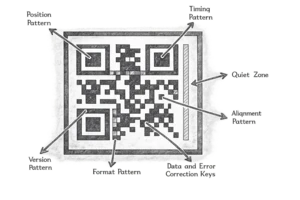
Empty space (Quiet Zone). Leave a clear margin around the code, usually 4 modules wide. This area helps the camera separate the QR pattern from surrounding design elements.
Vector format. For professional print, such as banners, packaging, or stickers, use SVG or EPS. These formats let you scale the code without blurred pixels or quality loss.
Frequently Asked Questions
Does a static QR code expire?
No. Because the data is encoded directly in the image, the code works as long as the physical medium remains intact and readable. The main reason it may stop being useful is that the information itself becomes outdated, for example if the linked web page is deleted.
Can I change the link or text after creating the code?
No. The static format does not support editing. Any change in the data requires a new code with a new graphic pattern. If you need to update the content without replacing the image, a dynamic format is the better choice.
Is internet access required to scan a static QR code?
The decoding process itself does not require internet access. If the code contains text, a vCard contact, or Wi-Fi settings, the smartphone processes them locally. However, if the code contains a link to a website, an internet connection is required to open that page.
How much data can a static code hold?
Technically, the standard allows up to 7089 digits or 4296 letters. In practice, we recommend keeping the content around 100-150 characters. Large amounts of data make the pattern too dense, which can make scanning much harder on real devices.
Why is my static QR code not scanning?
Common causes include low contrast, such as a light gray code on a white background, missing empty space (Quiet Zone) around the code, or a size that is too small for a dense pattern. For print, also make sure you use a vector format to avoid blurred pixels.
Can I add a logo to a static QR code?
Yes. Thanks to error correction, you can place a logo in the center of the code. It should not affect scanning if the logo covers no more than 25-30% of the pattern area. When adding graphic elements, we recommend choosing the highest error correction level in FbFast settings.