


Feedback, fast.
Online QR Code Generator — Static and Dynamic
Create QR codes with FbFast for websites, Wi-Fi, social media, contacts, documents, and payments. Customize their appearance, and with dynamic codes, update the content after creation and view scan analytics.
You can create a static QR code without registering. Sign in to your dashboard for dynamic QR codes and advanced design options.
QR Code Generator Features
Create QR codes for personal use, printed materials, and business. Choose the generator you need, customize the design, and save the finished code. Static QR codes contain encoded data that cannot be changed after creation. Dynamic codes let you update destination content, manage access, and view scans without replacing the QR code itself.
Create QR Codes Without Registering
Choose a generator, fill in the required fields, customize the available design elements, and download your QR code as a PNG or print it. The fields vary by type: for example, URL requires a link, while Wi-Fi requires network settings.
Match QR Codes to Your Style
Change colors and the shapes of modules and corner elements, and use frames, stickers, and predefined logos. After signing in, you get a wider selection of elements, gradients, custom logo uploads, and design templates.
Manage Your QR Codes
In the dashboard, you can give QR codes clear internal names and organize them into folders. For dynamic codes, you can also change destination content, configure access, and view scan analytics.
Learn more: Static QR Codes and Dynamic QR Codes.
How to Create a QR Code Online
Choose a QR code type.
For example, Website URL, Wi-Fi, vCard, Instagram, or PDF.
Enter your details.
Provide the link, contact information, network settings, or other data requested by the generator.
Customize the design.
Choose from the available colors, shapes, frames, or logos. Once you finish the design, test scanning on a device that will be used to scan the code.
Download or print.
The public form offers PNG downloads and printing; signed-in users have additional export formats.

QR Code Types for Different Tasks
Choose a generator for simple data or specialized uses: digital business cards, multiple links, images, and bank details. Each type has its own fields and settings, and you can adapt the QR code design to where it will be used.
Links, Documents, and Mobile Apps
Create QR codes that open a website, app listing, PDF document, or image gallery. This is useful for instructions, presentations, catalogs, and materials where a code is more convenient than a long address.
Contacts and Communication
Create a QR code for a vCard, email, SMS, or phone call. Static codes share contact information or launch the corresponding action, while certain dynamic types offer mobile landing pages.
Social Media and Messaging
Direct users to profiles and posts on Instagram, Facebook, TikTok, YouTube, X, or LinkedIn. Dedicated generators are available for messaging apps, and a page with multiple links can bring several profiles together.
Wi-Fi, Events, and Payments
A QR code can contain Wi-Fi settings, calendar event details, or transfer details in a supported payment format. A payment QR code shares payment details or launches the corresponding process in a compatible app; FbFast itself does not process the payment.

QR Code Design: Colors, Shapes, and Logos
A QR code does not have to be black and white. For all types, you can choose colors, change element shapes, and add visual details to match your materials or brand style.
Modules, Corners, Shapes, and Frames
Customize the main QR code modules and style the outer and inner parts of the corner markers separately. Various shapes, outlines, frames, and stickers are available. The public form has a limited selection, while the dashboard offers expanded design libraries.
Colors, Gradients, and Backgrounds
Use a solid color or gradient for the relevant design elements. Signed-in users can use linear and radial gradients with multiple colors, adjustable transparency, and color stop positions. The QR code background also supports transparency.
Add a Logo to Your QR Code
Choose a logo from the predefined library or upload your own after signing in. In the dashboard, you can adjust the logo size, margins, and background behind it.
Export and Design Templates
Download the finished QR code as a PNG or print it. After signing in to your dashboard, you can also use WEBP, JPG, and SVG. Signed-in users can create their own design templates to reuse the same appearance.
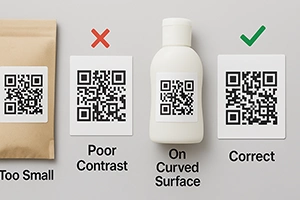
Before printing or publishing, test the QR code by scanning it, especially if you have changed colors or module shapes, or added a logo.

Dynamic QR Codes: Update Content Without Reprinting
Dynamic QR codes work well when links or access conditions may change. For example, a code may already be printed on packaging or a poster when you need to update the address of a promotional page. You can change the settings in your dashboard without replacing the QR code itself.
Update the Link
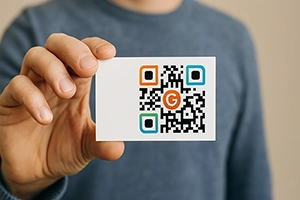
With a dynamic Website URL code, you can change the destination address after creating the QR code. This is useful for materials that stay in circulation for a long time: menus, flyers, labels, or business cards.
Smart Link
Create rules that direct scans to different HTTPS addresses. For example, you can use country, language, device type, browser, operating system, or time. A single QR code can then lead to different pages depending on the condition you set.
Passwords, Age Confirmation, and Limits
For dynamic QR codes, you can configure a password prompt, age confirmation, a scan limit, and availability start and end dates. Age confirmation here means the visitor answers a question; it does not verify a document or the visitor’s identity.
Custom Domains for Dynamic Links
By default, dynamic links use the short domain qri.li. If your plan supports custom domains, you can connect your own domain and customize the link prefix. Current terms are available on the pricing page.

QR Code Scan Analytics
Dynamic QR codes let you update content and view scan data. Use this data to assess interactions with a code on packaging, printed advertising, or other media.
Statistics for Individual QR Codes
View scan counts and use them to compare activity across different QR codes. For example, separate codes on flyers and storefront windows help distinguish interactions with each material.
UTM Parameters for Destination Links
If you set a destination URL in a dynamic QR code, you can add standard UTM parameters regardless of the generator type. Use them to identify the campaign, source, or medium for later analysis of visits on the destination website, provided web analytics is configured there.
Data for Evaluating Campaigns
Scan counts show interactions with a QR code, but they do not equal the number of purchases, inquiries, or unique people. To assess conversions, compare this data with events on the destination website or in another tracking system.
More about these features: QR Code Analytics.

Mobile Landing Pages for Dynamic QR Codes
Certain dynamic QR codes open mobile landing pages. Depending on the generator, a page helps visitors perform a specific action or displays information configured by the QR code owner. This is part of the functionality of the respective generators.
Landing Pages for Email, Phone Calls, and SMS
Dynamic QR codes for Email, Phone Call and SMS offer landing pages for the corresponding actions: preparing an email, making a phone call, or sending an SMS message. Instead of a simple link, visitors get a dedicated page for the type of communication they need.
Landing Pages You Can Customize
For other dynamic types, you can customize the landing page content within the capabilities of the specific generator:
- Social Media — a page with multiple profiles and links.
- Mobile App — a page for your app with links to the App Store or Google Play.
- Digital Business Card (vCard) — a page with contact information you can update.
- Facebook — a customizable landing page for the corresponding Facebook QR code.
- Image Gallery — a page with the photos you have added.
Each generator has its own purpose and set of settings. This lets you choose a page format that fits your task rather than build one from scratch.

Where QR Codes Are Used
QR codes connect physical materials to digital resources: pages, contacts, documents, and apps. A static code is often enough for personal use; dynamic codes can be useful for materials with content that changes.
Business and Marketing
Place QR codes on packaging, flyers, displays, or storefront windows. Direct visitors to a product description, a current offer, or an external inquiry form page. If the materials are already printed, a dynamic QR code lets you change the link later.
Events and Exhibitions
Add QR codes to badges, posters, and event programs. They can open a schedule, venue location, external registration page, or speaker materials. A dedicated static vEvent generator is available for calendar events.
Education and Learning
Use codes to access learning materials, homework, videos, and external surveys. A QR code on a handout makes it easy to open an additional resource from a smartphone.
Cafés, Restaurants, and Services
Display a QR code for a menu, booking page, or contact page. A dynamic link works well for menus or other pages whose addresses may need to change without reprinting signs.
Stores and Retail Locations
Add QR codes to price tags, receipts, instructions, and demonstration materials. They can lead to product specifications, a video review, or contact with a sales advisor.
Freelancing and Professional Contacts
Create a digital business card in vCard format or a QR code linking to your portfolio. Use a page with multiple links to bring together profiles and contact channels.
Real Estate and Public Services
QR codes on information signs can lead to property descriptions, schedules, documents, and contacts. Visitors do not need to copy the address manually.
Choose a QR Code Generator
Explore generators for common tasks below. Some types offer both static and dynamic versions; the available settings depend on the type you choose.
Social Media and Content
PopularMessaging and Quick Contact
Quick AccessBusiness, Contacts, and Materials
For WorkPayments and Bank Details
ServicesOther supported static payment formats include UPI Payment, PayPal, and PIX Payment. Dedicated generators are also available for these formats.
Contact
We’re happy to talk to you.
Stay connected
Stay in touch. We're always ready to help you with whatever you need.
Drop us a line
Have a question or suggestion? We'd love to hear from you. Let's talk—get in touch anytime.